
Restaurant Ordering & Operations
Run your restaurant.
From QR orders to kitchen to delivery.
Guests scan a QR code and order from their browser. Every order lands in your kitchen display, your orders screen and your delivery dispatch — no app downloads, no hardware, one simple platform.
- No app downloads
- No hardware
- Free while we’re launching
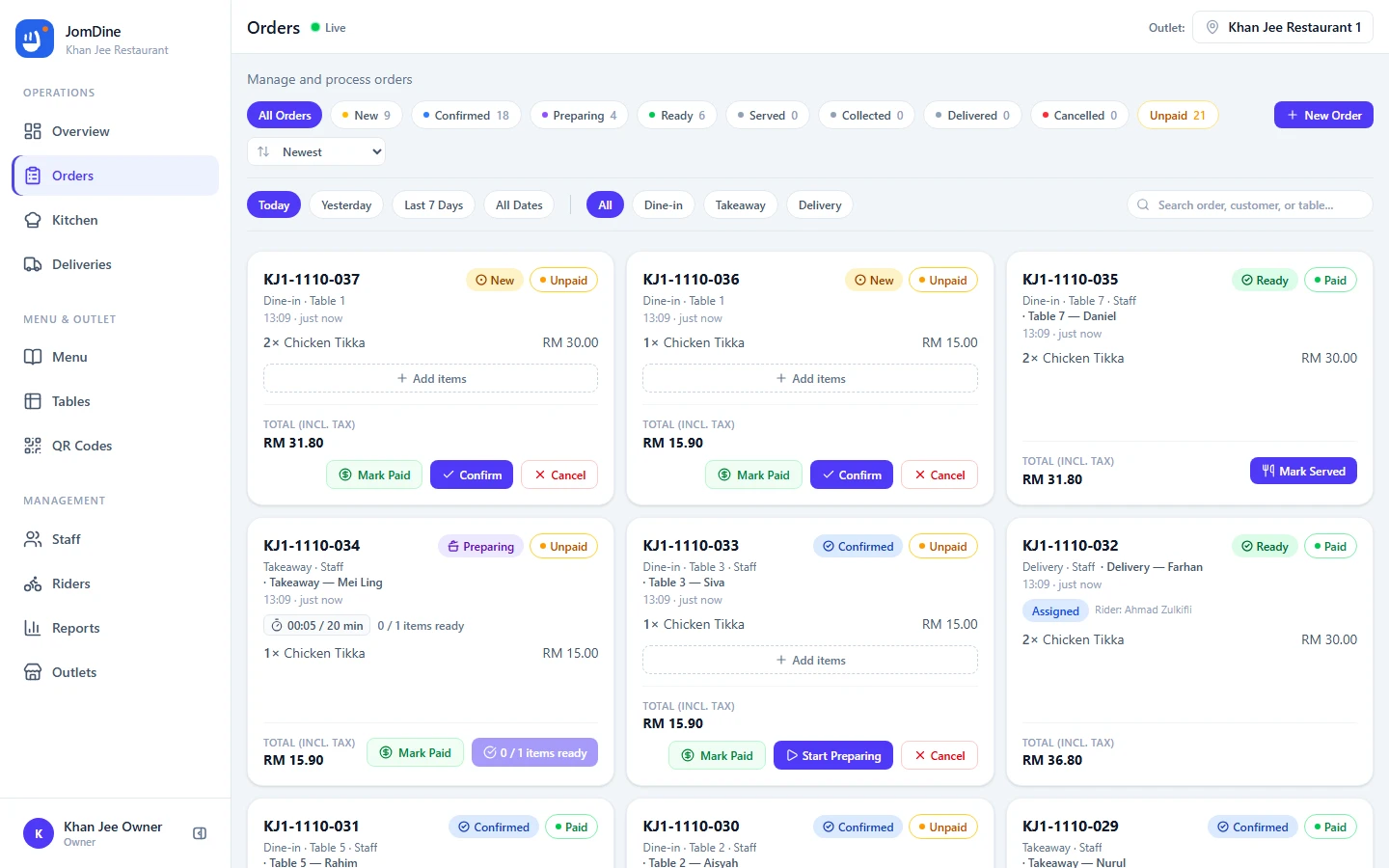
Everything your restaurant needs to manage orders.
QR Ordering
Guests scan, browse and order from the table.
Digital Menu
Categories, items, prices and availability.
Kitchen Display
A live board from new order to ready.
Multi-Outlet
Every outlet under one business account.
Restaurant ordering shouldn't be complicated.
The small problems that repeat every service add up — JomDine replaces them with one connected flow.
Customers waiting to order
Guests flag down staff before they can even see a menu.
Printed menus becoming outdated
Prices and items change faster than the print shop.
Orders being missed
Hand-written tickets get lost between the table and the kitchen.
Manual order entry
Staff re-key every order into a separate system.
Kitchen staff relying on paper
No clear view of what to prepare next, or what is running late.
Difficult outlet management
Each location runs its own tools — nothing rolls up together.
One connected flow from customer to kitchen.
The same workflow the JomDine product uses — nothing gets re-keyed, nothing gets lost.
- 01 SCAN
Customer scans the QR code.
- 02 BROWSE
Customer views the digital menu.
- 03 ORDER
Customer places the order.
- 04 KITCHEN
Order reaches the kitchen.
- 05 PREPARE
Staff prepare the food.
- 06 READY
Order becomes ready.
- 07 SERVE / COLLECT
Customer receives the order.
Make ordering easier for your customers.
Customers order from their browser — no app to install, no account to create, just a name at checkout.
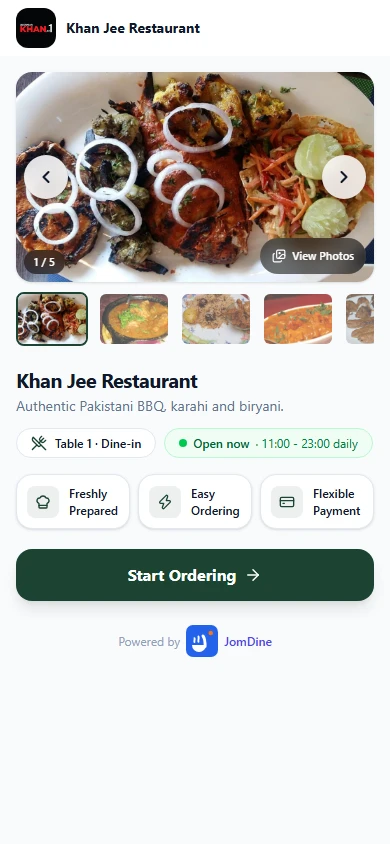
1 Scan QR / Landing
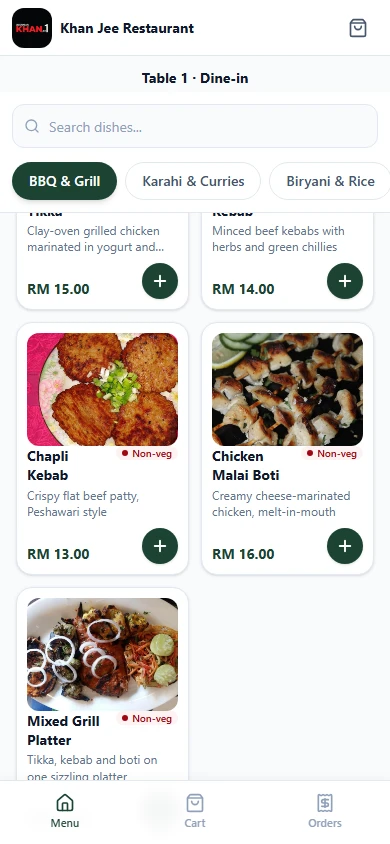
2 Menu
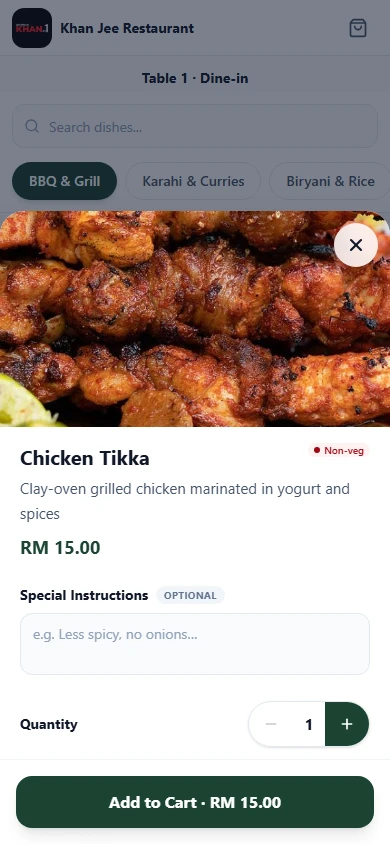
3 Item Details
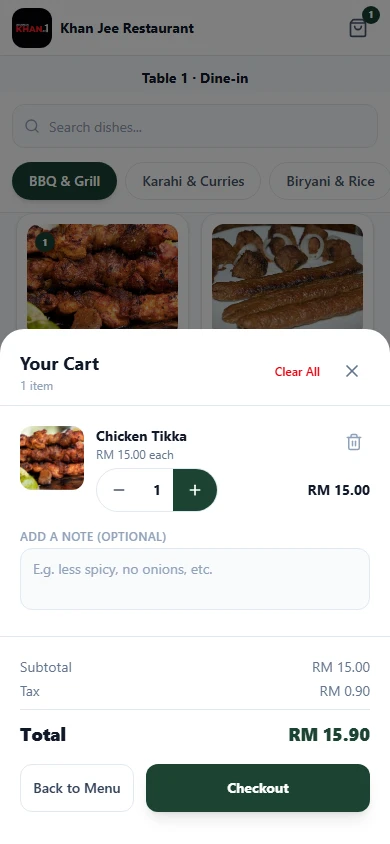
4 Cart
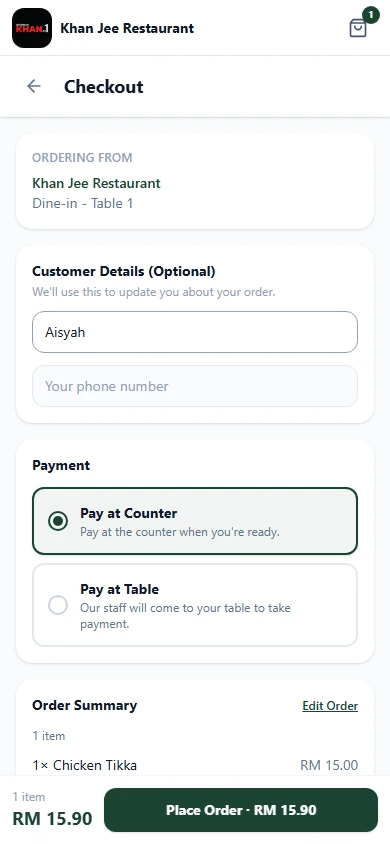
5 Checkout
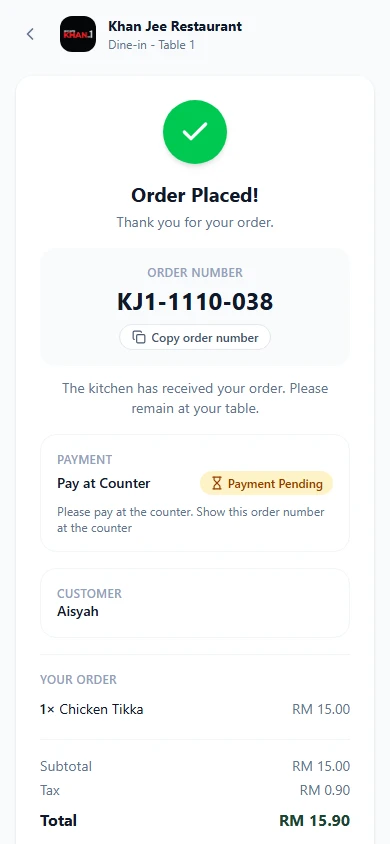
6 Confirmation
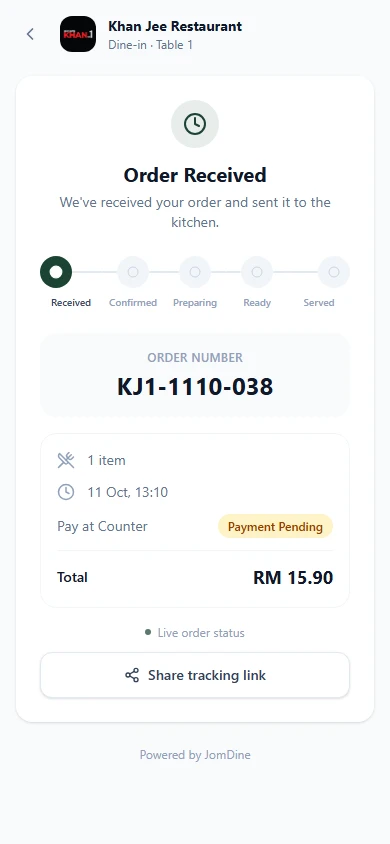
7 Tracking
Swipe to follow the flow
- Mobile-first
- Guest ordering
- Digital menu
- Item modifiers
- Simple checkout
- Order tracking
- English & Urdu
One platform, every part of the service.
Ordering and operations in one place — no integrations to maintain, no separate systems to reconcile.
QR Ordering
Give customers a simple way to browse your menu and place orders from their table or outlet.
Digital Menu
Manage categories, items, prices, modifiers and availability from one place.
Order Management
Manage dine-in, takeaway and delivery orders from one operational workspace.
Kitchen Display
Keep kitchen staff focused with a clear workflow from new order to ready.
Tables & QR Codes
Create tables and generate secure QR codes for each ordering location.
Staff & Roles
Give team members access based on their role and outlet.
Multi-Outlet
Manage multiple outlets under one business account.
Reports
Understand orders, sales, payment status and best-selling items.
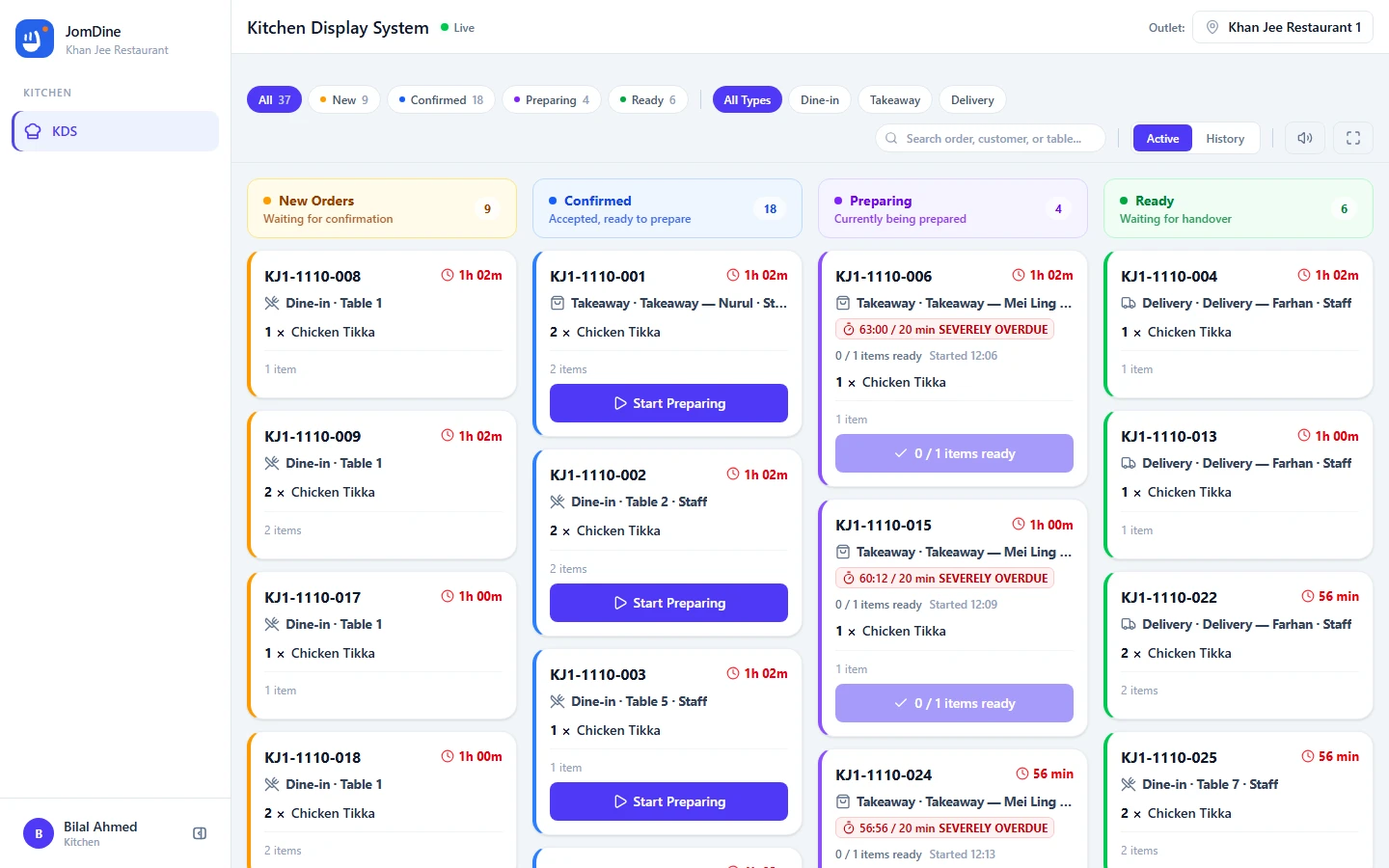
Give your kitchen a clear workflow.
Orders appear in a clear kitchen workflow so staff know what needs attention.
- Live board that refreshes automatically as orders arrive
- Start Preparing asks for a time estimate, then live timers flag every ticket that runs over
- Item-level ready tracking — an order is READY when every line is ready
- Table number, items and notes visible at a glance
Keep every order in one place.
Every dine-in, takeaway and delivery order lands in one operational screen — with everything your team needs to act on it.
- Order number, order type and table on every order
- Live status from NEW to SERVED / COLLECTED / DELIVERED
- Payment status shown where payment applies
- Operational actions to confirm, prepare, ready and serve
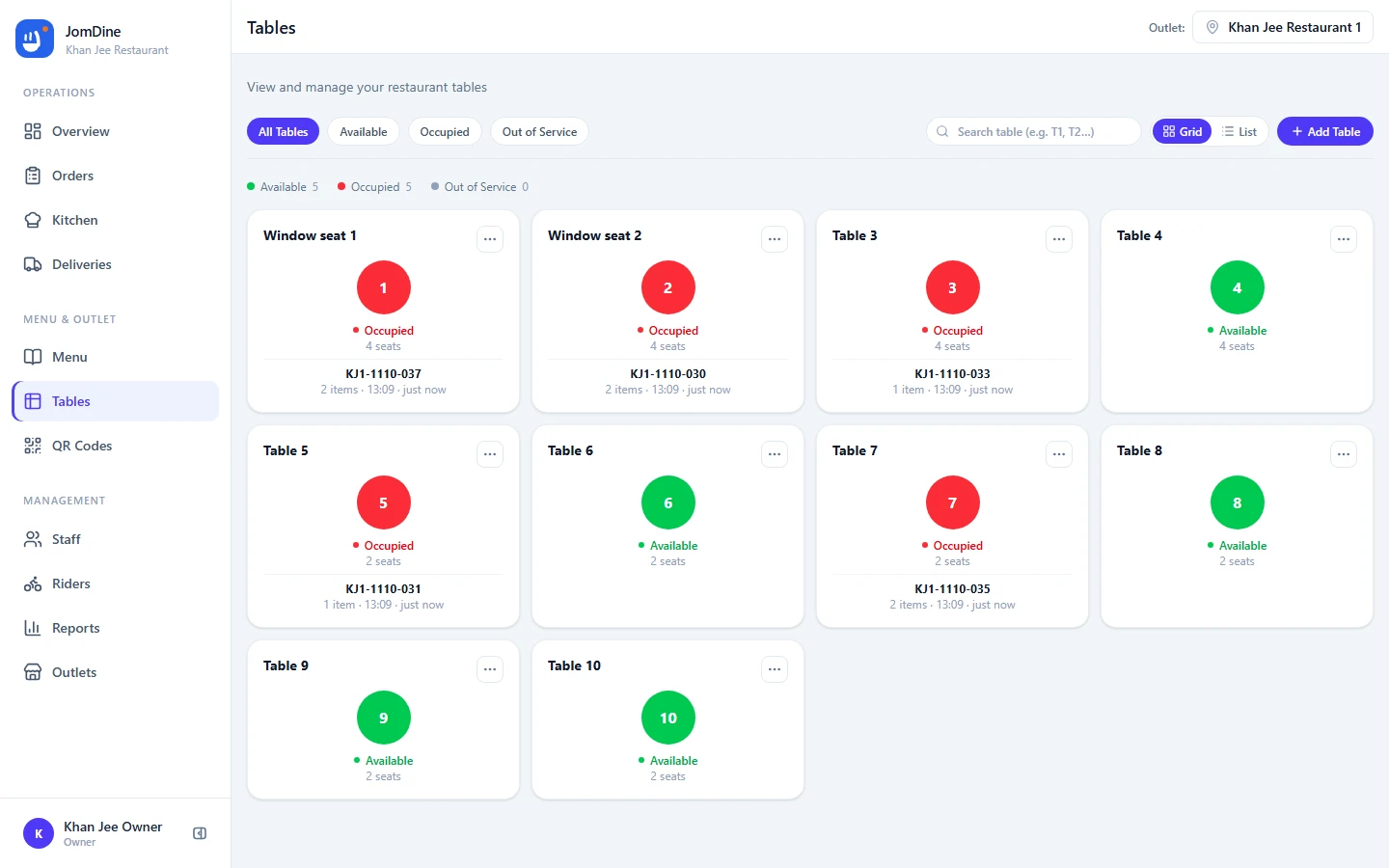
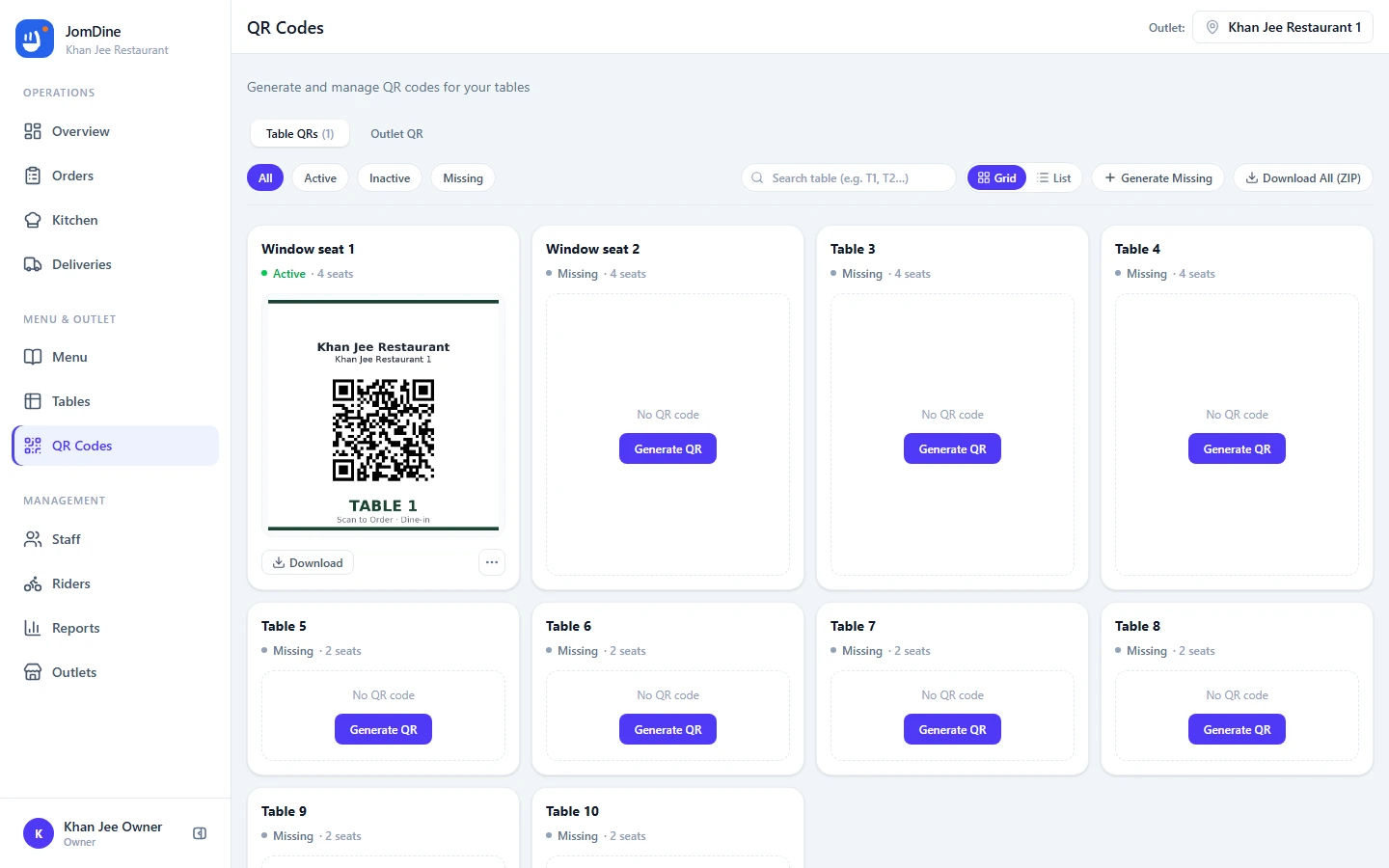
Connect every table with a QR code.
Every table gets its own secure QR. Tables show live occupancy from open orders — regenerate or deactivate codes without touching the table.
- Table
- QR Code
- Customer Menu
- Order
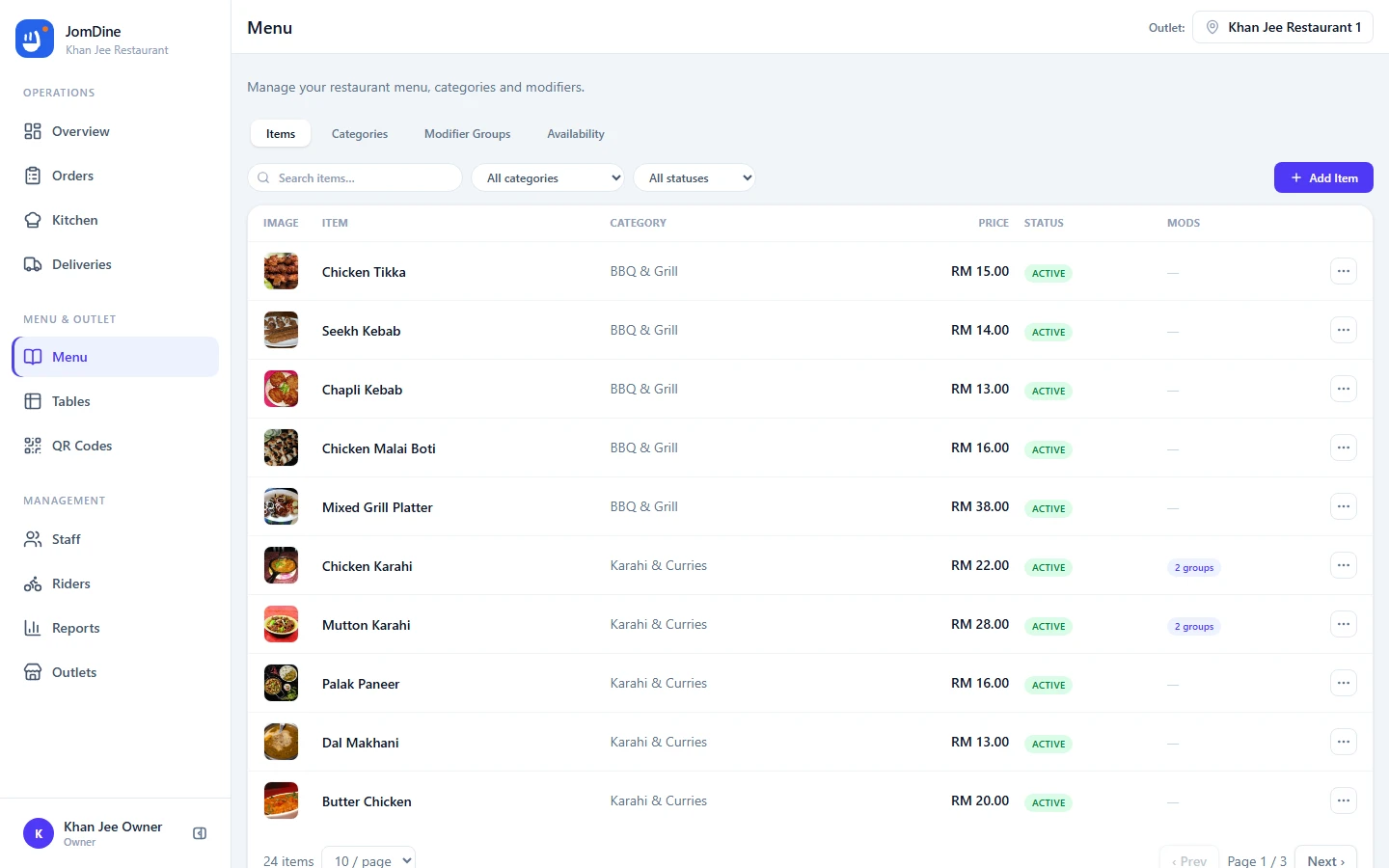
Keep your menu fresh and easy to manage.
Update a price or mark an item sold out and the customer menu reflects it instantly — availability is controlled per outlet.
- Categories, items, prices and descriptions in one screen
- Item modifiers for sizes, add-ons and spice levels
- Your logo and brand color on the customer menu
- Mark items sold out without removing them from the menu
- Menu availability controlled per outlet
- Menu
- Categories
- Items
- Modifiers
- Availability
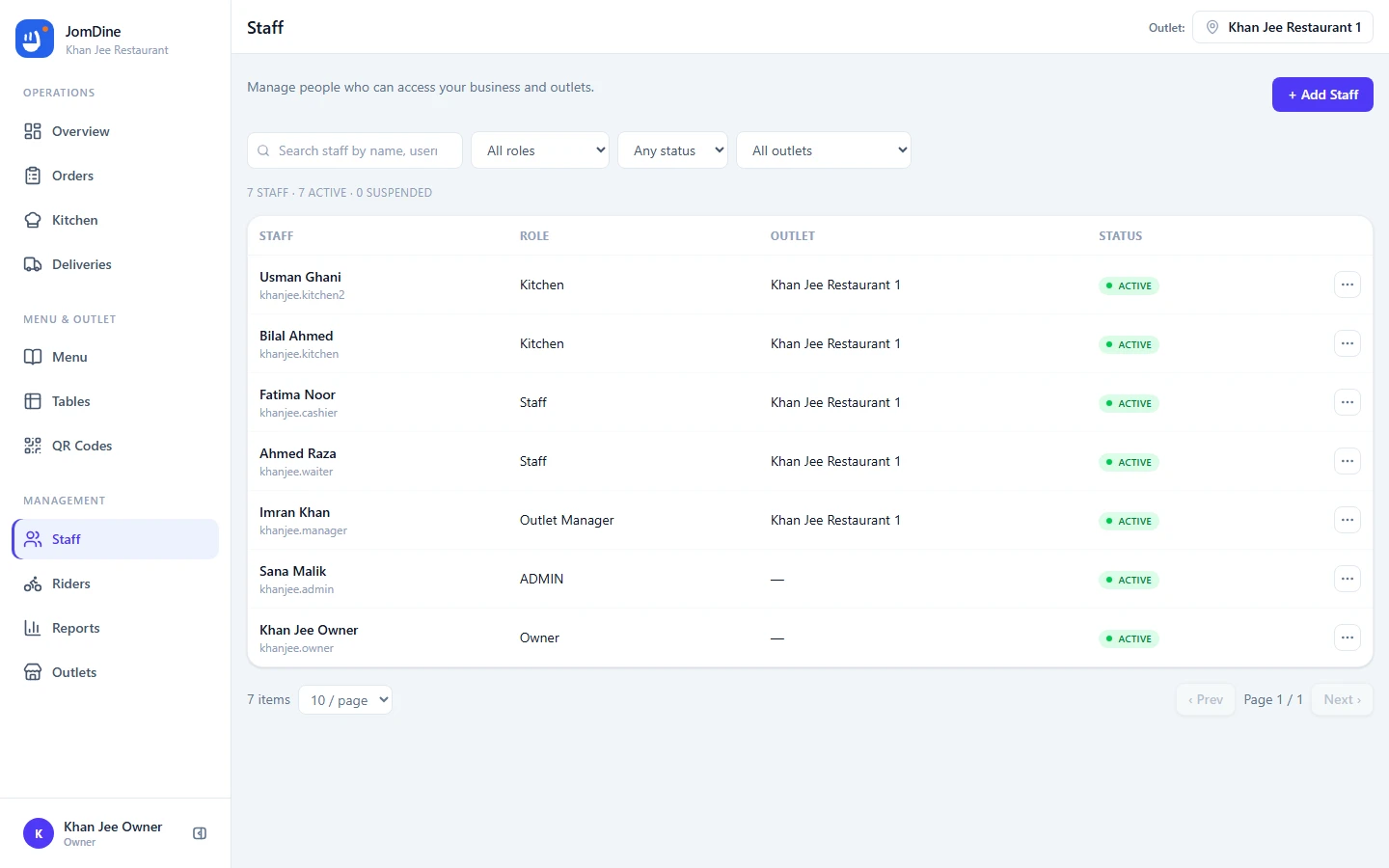
Give every team member the right access.
Each person sees exactly the workspace their role needs — owners see the business, kitchen staff see the kitchen board.
- Roles from OWNER to KITCHEN, each with its own permissions
- Staff accounts scoped to their outlet
- Kitchen staff land straight on the kitchen board
- Owner and admin manage businesses, outlets and menus
One business. Multiple outlets.
A single business can manage multiple outlets while keeping outlet-specific operations separate.
- Business is the main organization — one login for the owner
- Outlets operate independently with their own orders and kitchen
- Staff are assigned to the outlets they work in
- QR codes belong to their outlet and table
- Menu items are shared while availability can differ by outlet
- Outlet 1MenuOrdersKitchenTablesQR CodesStaffDeliveriesRiders
- Outlet 2MenuOrdersKitchenTablesQR CodesStaffDeliveriesRiders
- Outlet 3MenuOrdersKitchenTablesQR CodesStaffDeliveriesRiders
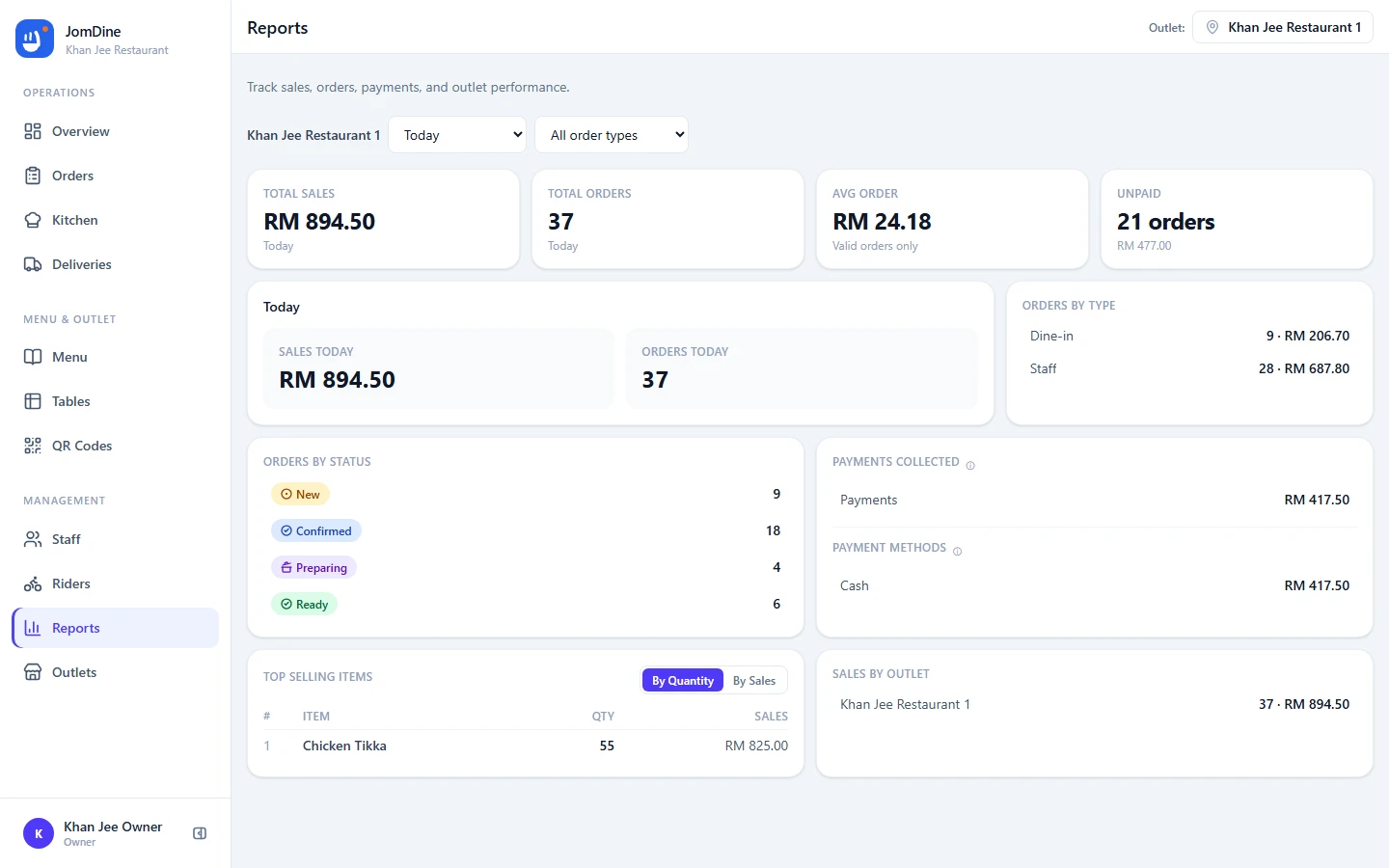
Understand how your restaurant is performing.
Daily sales, order volume and your best sellers — aggregated per outlet.
- Total sales, order count and average order value
- Payment summary broken down by method
- Top selling items so you know what to push
- Filter by outlet, date range and order type
- Sales
- Orders
- Average Order Value
- Payment Summary
- Top Selling Items
- Order Types
- Delivery Summary
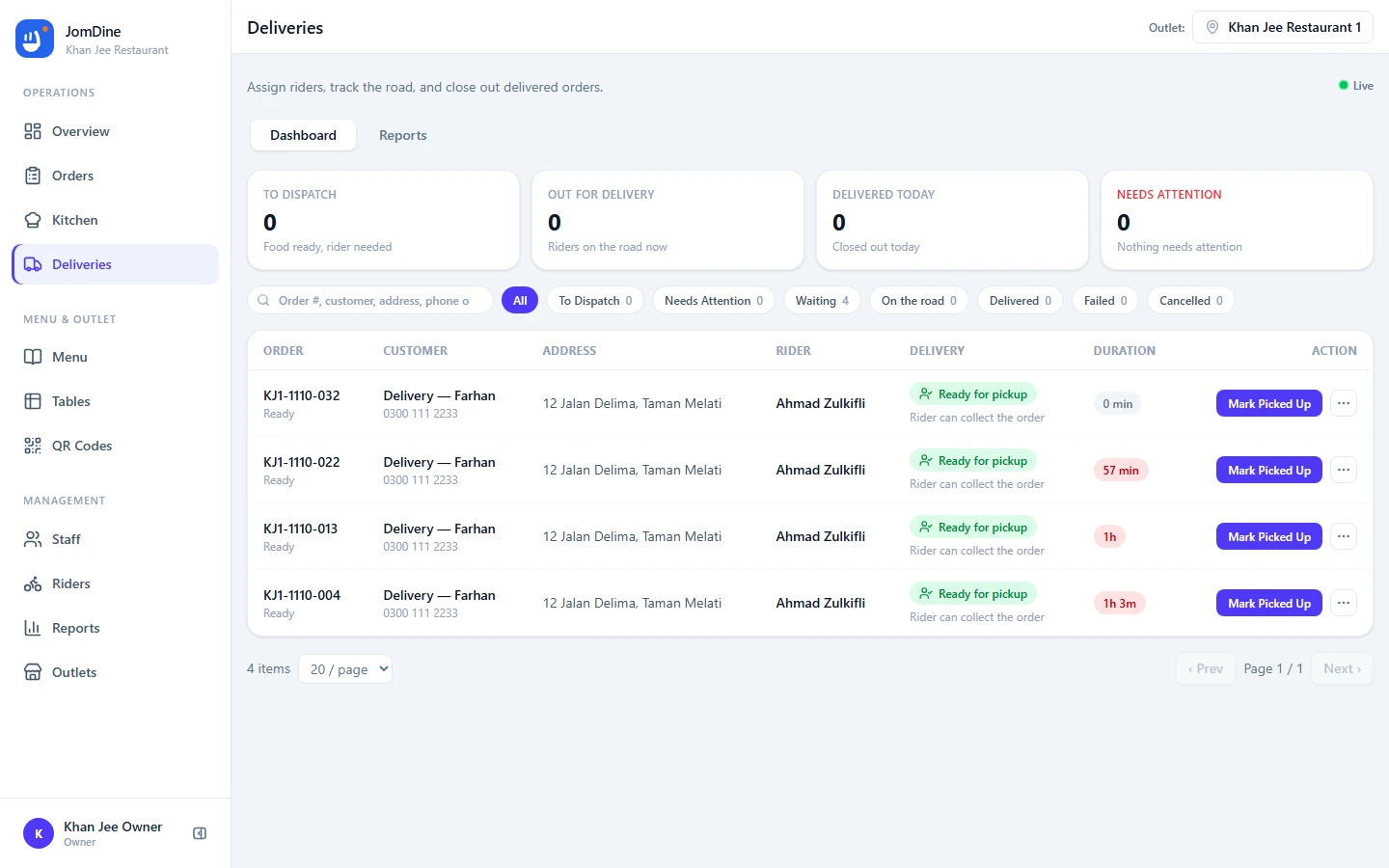
Take orders to your customers' door.
Delivery orders get their own dispatch board — from the kitchen pass to the rider's hand, tracked end to end.
- Delivery orders with a delivery fee frozen at the moment of order
- Orders become dispatchable when the kitchen marks them READY
- Assign a rider, watch Out for delivery, confirm DELIVERED
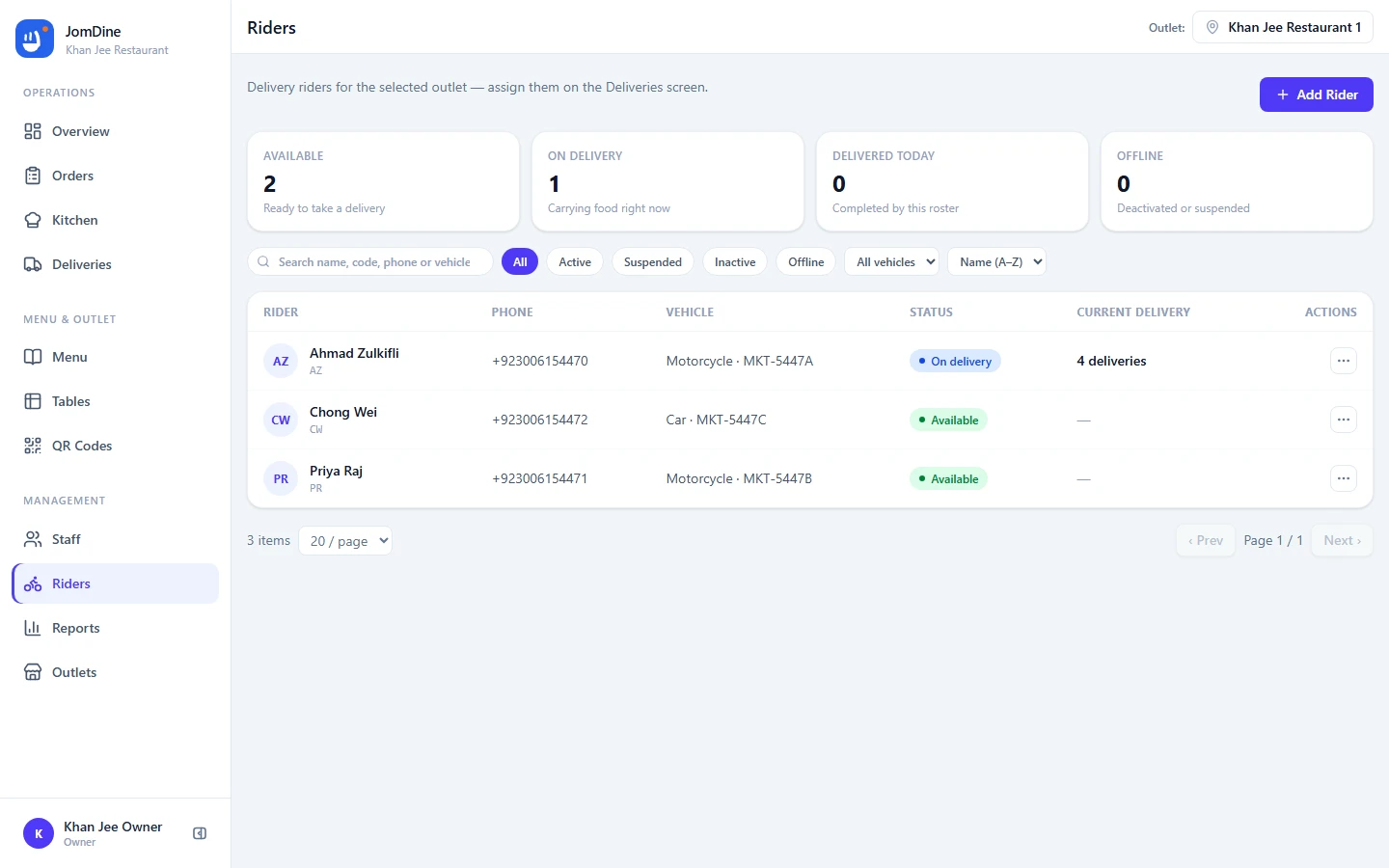
- Rider roster per outlet: active riders, vehicles, deactivation safety
Built for modern food businesses.
The same platform adapts to how you serve — every business gets QR ordering, a digital menu and the full kitchen workflow.
Restaurant
Table QRs, live occupancy and a kitchen display built for table service.
Cafe
Counter QR ordering with a menu that updates the moment something runs out.
Food Truck
One outlet, one QR, full order tracking — no tables or hardware required.
Kiosk
A single ordering point that feeds straight into your kitchen workflow.
Stall
Set up in minutes: menu, QR code and live orders from day one.
Pop-up
Spin up an outlet for the event, take orders, close it when you’re done.
- Dine-in
- Takeaway
- Delivery
Three steps to your first order.
Contact us
Reach out on WhatsApp or email hello@jomdine.io — we create your business, first outlet, tables and QR codes for you.
Add your menu
Categories, items, prices and modifiers — with your logo and brand color on the customer menu.
Start taking orders
Guests scan and order, the kitchen works the live board, and riders take deliveries out the door.
Start simple.
Set up your restaurant and start exploring JomDine.
Free while we're launching.
- Unlimited menu items and categories
- Table and outlet QR codes
- Kitchen display and live orders
- Staff accounts with roles
- All outlets included
No credit card required.
Questions, answered.
JomDine is a restaurant ordering and operations platform: QR ordering, a digital menu, order management, a kitchen display, tables, staff roles, reports and multi-outlet management — connected in one simple platform.
Each table has its own QR code. A customer scans it with their phone camera, the menu opens in the browser, and they place their order. The order goes straight to the kitchen display and the Orders screen.
No. Customers order from their browser without installing a restaurant-specific app. There is nothing to download and no account to create.
Yes. Guests only enter a name at checkout — no sign-up, no login, no personal data beyond the order itself.
Yes. One business account can run multiple outlets, each with its own menu, orders, kitchen, tables, QR codes and staff — with reports across all of them.
Yes. Menu items are managed per outlet: an item can be sold out or switched off at one outlet while staying available at another.
Yes. The kitchen display is a live board that moves orders through NEW, CONFIRMED, PREPARING, READY and SERVED / COLLECTED / DELIVERED, with a fullscreen mode for a kitchen screen.
Yes. Roles include OWNER, ADMIN, OUTLET_MANAGER, CASHIER, STAFF and KITCHEN — each sees the workspace their role needs, scoped to their outlet.
Yes. Besides per-table QRs for dine-in, every outlet has a counter QR for takeaway — and delivery orders are fully supported, dispatch, riders and all.
Contact us on WhatsApp or at hello@jomdine.io — we set up your business, first outlet and QR codes for you, then you add your menu and start taking orders.
Ready to simplify your restaurant?
Set up your menu, connect your outlets and take QR orders, kitchen tickets and deliveries in one place.